

Introduction #
Global Settings allow you to configure how Ezhance behaves across your entire store.
Unlike Promotion Settings, which only affect a single promotion, Global Settings apply to all promotions unless otherwise specified.
These settings help you control:
- How discounts are calculated
- How multiple promotions interact
- How prices are displayed
- How BOGO rewards are added
- How promotion information appears on product pages
- How Order Coupons are presented to customers
Understanding these settings is important because they directly affect how promotions behave throughout your store.
How Global Settings Work #
Global Settings are evaluated automatically whenever Ezhance processes promotions.
They provide store-wide defaults that control promotion behavior and storefront displays.
Example:
Product Discount Strategy:
Biggest Discount
Result:
Whenever multiple product promotions match, Ezhance automatically selects the largest discount.
Without Global Settings, merchants would need to configure this behavior individually for every promotion.
Accessing Global Settings #
Navigate to:
Ezhance → Settings

Available Global Settings #
Ezhance provides several global configuration options:
- Price Source
- Product Discount Strategy
- Cart Discount Strategy
- Product Page Display Settings
- Strikeout Pricing
- BOGO Settings
- Order Coupon Settings
Price Source #
Price Source determines which WooCommerce price Ezhance should use when calculating discounts.
Available Options:
- Regular Price
- Sale Price
Regular Price #
Discounts are calculated using the product’s regular price.
Example:
Regular Price:
$100
Sale Price:
$80
Discount:
10%
Calculation:
$100 − 10%
Final Price:
$90
Sale Price #
Discounts are calculated using the current sale price.
Example:
Regular Price:
$100
Sale Price:
$80
Discount:
10%
Calculation:
$80 − 10%
Final Price:
$72
When To Use Regular Price
- Storewide promotions
- Standard discount campaigns
- Prevent excessive discount stacking
When To Use Sale Price
- Additional discounts on sale products
- Clearance campaigns
- Special promotional events
Product Discount Strategy #
Product Discount Strategy controls what happens when multiple product promotions match the same product.
Available Options:
- Biggest Discount
- Smallest Discount
- Stack All
Biggest Discount #
Ezhance applies the largest available discount.
Example:
Promotion A:
10% Off
Promotion B:
20% Off
Result:
20% Off applies.
Smallest Discount #
Ezhance applies the smallest available discount.
Example:
Promotion A:
10% Off
Promotion B:
20% Off
Result:
10% Off applies.
Stack All #
Ezhance applies all eligible product discounts.
Example:
Promotion A:
10% Off
Promotion B:
20% Off
Result:
Both discounts are applied according to Ezhance’s stacking logic.
Cart Discount Strategy #
Cart Discount Strategy controls what happens when multiple cart-level promotions match.
Available Options:
- Stack All
- Best Discount Only
- Best Discount + Free Shipping
- Free Shipping Only
Stack All #
All eligible cart promotions are applied.
Best Discount Only #
Only the highest-value cart discount is applied.
Best Discount + Free Shipping #
The highest-value discount is applied together with free shipping.
Free Shipping Only #
Only free shipping promotions are applied.
Example:
Cart Discount:
15% Off
Free Shipping Promotion:
Eligible
Strategy:
Best Discount + Free Shipping
Result:
Customer receives both benefits.
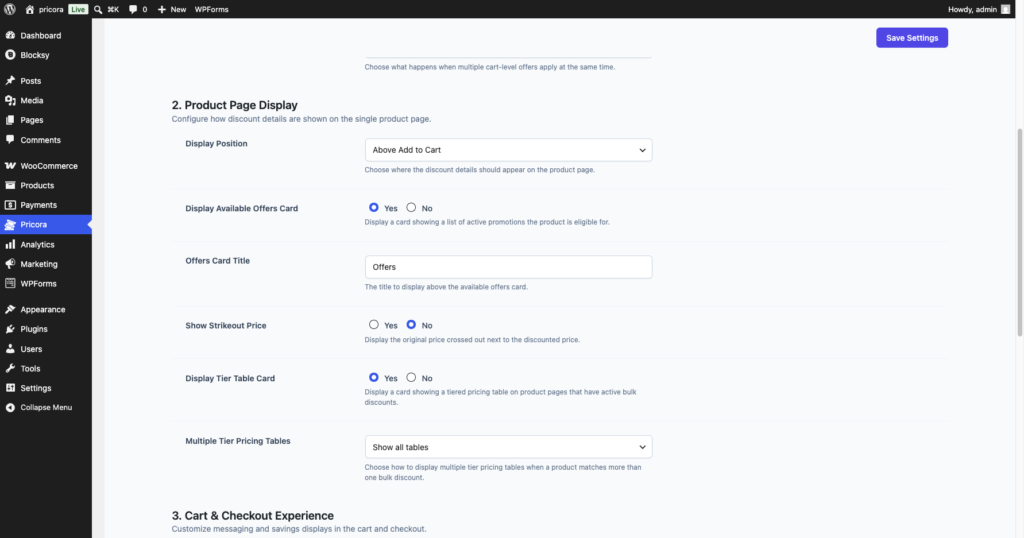
Product Page Display Settings #
Product Page Display Settings control how promotion information appears on product pages.
These settings affect storefront visibility and customer experience.
Examples include:
- Offer Card visibility
- Tier Pricing Table display
- Promotion messaging placement
Strikeout Pricing #
Strikeout Pricing displays the original product price alongside the discounted price.
This helps customers understand the value of the promotion.
Example:
Original Price:
$100
Discounted Price:
$80
Displayed As:
$100 → $80
This creates a stronger visual perception of savings.
Benefits:
- Improves conversion rates
- Highlights savings
- Increases promotion visibility
BOGO Settings #
BOGO Settings control how Buy X Get X and Buy X Get Y promotions behave.
The most important setting is:
Auto Add Free Item #
When enabled, Ezhance automatically adds the free reward product to the cart.
Example:
Promotion:
Buy 2 Caps
Get 1 Cap Free
Auto Add Free Item:
Enabled
Result:
The free Cap is automatically added to the cart.
When disabled, customers may need to add the reward product manually.

Order Coupon Settings #
Order Coupon Settings control how generated coupons are displayed to customers.
Available settings include:
- Voucher Title
- Voucher Subtitle
- Voucher Description
These settings allow you to customize the coupon experience.
Example:
Voucher Title:
Special Discount Offer
Voucher Subtitle:
For Your Next Purchase
Voucher Description:
Thank you for your order. Enjoy this exclusive discount on your next purchase.
Available Order Coupon Placeholders #
Order Coupon content supports dynamic placeholders.
Available placeholders include:
- {{coupon_code}}
- {{discount}}
- {{customer_name}}
- {{expiry_date}}
- {{store_name}}
These placeholders are automatically replaced with real values when the coupon is generated.
Common Use Cases #
Conservative Discount Strategy #
Settings:
Price Source:
Regular Price
Product Discount Strategy:
Biggest Discount
Result:
Customers receive the best available discount without stacking.
Aggressive Promotion Strategy #
Settings:
Price Source:
Sale Price
Product Discount Strategy:
Stack All
Result:
Customers can receive multiple promotional benefits.
Automated BOGO Campaigns #
Settings:
Auto Add Free Item:
Enabled
Result:
Free gifts are added automatically.
Customer Retention Campaigns #
Settings:
Order Coupon Voucher enabled
Result:
Customers receive incentives for future purchases.
Best Practices #
Choose A Discount Strategy Before Launch #
Determine how multiple promotions should interact before creating campaigns.
Test Price Source Settings #
Verify that discounts are calculated using the expected price source.
Use Strikeout Pricing #
Showing savings often improves conversion rates.
Enable Auto Add For BOGO Promotions #
Automatic rewards provide a better customer experience.
Customize Order Coupon Messaging #
Clear voucher messaging improves coupon redemption rates.
Common Mistakes #
Using Sale Price Without Understanding The Impact #
Discounts may become larger than expected when calculated from sale prices.
Forgetting About Promotion Stacking #
Multiple promotions can interact differently depending on the selected strategy.
Disabling Strikeout Pricing #
Customers may not immediately recognize the value of a promotion.
Testing Without Reviewing Global Settings #
Unexpected promotion behavior is often caused by global configuration choices.
Troubleshooting #
If promotions are behaving unexpectedly:
Check:
- Price Source
- Product Discount Strategy
- Cart Discount Strategy
- BOGO Settings
- Product Page Display Settings
Many promotion issues can be traced back to Global Settings configuration.