

Introduction #
Exclude Sale Items allows you to prevent promotions from applying to products that already have a WooCommerce sale price.
This feature is useful when you want to:
- Protect profit margins
- Prevent double discounts
- Exclude clearance products
- Run promotions only on full-price products
- Control discount stacking
Many stores use this setting to ensure customers do not receive multiple discounts on the same product.
How Exclude Sale Items Works #
When enabled, Ezhance checks whether a product currently has an active WooCommerce sale price.
If the product is on sale, it is automatically removed from the promotion target list.
If the product is not on sale, it remains eligible.
Ezhance evaluates products using the following process:
Build Target List
        ↓
Check Sale Status
        ↓
Remove Sale Products
        ↓
Create Final Target List
        ↓
Evaluate Eligibility Rules
        ↓
Apply Promotion
Quick Example #
In this example, we want to offer a promotion on all Hoodies except products already on sale.
Promotion Type:
Simple Discount
Discount:
20%
Target:
Category = Hoodies
Exclude Sale Items:
Enabled
Result:
Full-price Hoodies receive the discount.
Hoodies with active sale prices do not receive the promotion.
Configuring Exclude Sale Items #
Navigate to:
Ezhance → Promotion → Target Selection
Enable:
Exclude Sale Items
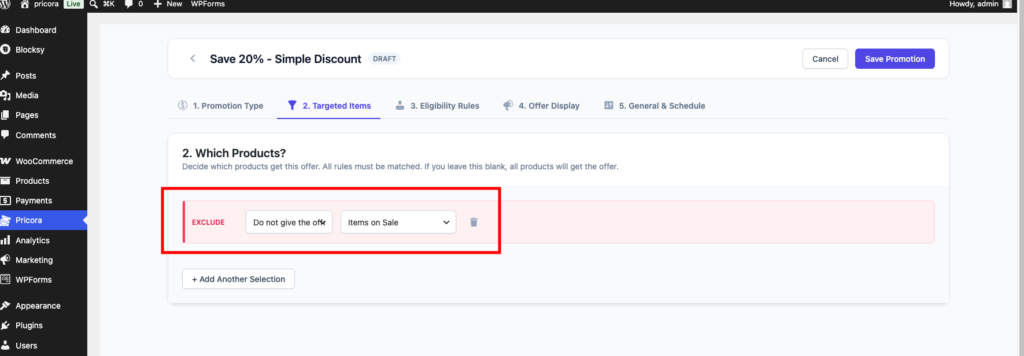
After saving the promotion, sale products are automatically excluded.
What Counts As A Sale Item? #
A product is considered a sale item when WooCommerce currently shows a valid sale price.
Example:
Regular Price:
$100
Sale Price:
$80
Result:
The product is considered on sale.
If Exclude Sale Items is enabled, the promotion will not apply.
Example: Product Receives Promotion #
Product:
Premium Hoodie
Regular Price:
$100
Sale Price:
Not Set
Promotion:
20% Off
Exclude Sale Items:
Enabled
Result:
The product receives the promotion because it is not on sale.
Example: Product Does Not Receive Promotion #
Product:
Premium Hoodie
Regular Price:
$100
Sale Price:
$80
Promotion:
20% Off
Exclude Sale Items:
Enabled
Result:
The product is excluded from the promotion because it already has a sale price.
Why Use Exclude Sale Items? #
Many stores already run WooCommerce sales.
Without Exclude Sale Items, customers could receive:
- WooCommerce sale pricing
- Ezhance product discounts
on the same product.
This may reduce profit margins more than intended.
Exclude Sale Items helps maintain control over pricing.
Common Use Cases #
Protecting Profit Margins #
Prevent already-discounted products from receiving additional discounts.
Example:
Storewide promotion excluding products already on sale.
Clearance Products #
Keep clearance inventory separate from promotional campaigns.
Example:
Clearance products remain at their existing sale price.
Seasonal Promotions #
Apply promotions only to full-price inventory.
Example:
Summer Sale excluding clearance products.
Category-Wide Campaigns #
Target an entire category while automatically excluding discounted items.
Example:
20% Off Hoodies excluding sale items.
Exclude Sale Items And Different Promotion Types #
Exclude Sale Items works with all promotion types that target products.
Simple Discount #
Prevents discounts on sale products.
Bulk Discount #
Prevents quantity pricing from applying to sale products.
Buy X Get X #
Excludes sale products from qualifying product targets.
Buy X Get Y #
Excludes sale products from Buy Product targets.
Order Coupon #
Prevents coupon qualification based on sale products.
Exclude Sale Items And Eligibility Rules #
Exclude Sale Items affects Target Selection.
It does not affect Eligibility Rules.
Example:
Target:
Category = Hoodies
Exclude Sale Items:
Enabled
Eligibility Rule:
Cart Subtotal greater than $100
Result:
Only full-price Hoodie products can qualify.
The cart subtotal condition is evaluated afterward.
Common Mistakes #
Forgetting A Product Is Already On Sale #
This is the most common cause of confusion.
A product may appear to match the promotion but is excluded because WooCommerce considers it a sale item.
Assuming Eligibility Rules Are Causing The Issue #
Sale products are removed during Target Selection.
Eligibility Rules are evaluated later.
Testing With Sale Products Only #
If every targeted product is already on sale, the promotion may appear inactive.
Forgetting About Scheduled Sale Prices #
WooCommerce scheduled sale prices can automatically turn products into sale items.
Troubleshooting #
If a product is not receiving a promotion:
Check:
- Does the product have a sale price?
- Is Exclude Sale Items enabled?
- Is a scheduled sale currently active?
- Does the product still match the remaining target rules?
If the answer is yes, the product is likely being excluded intentionally.
Best Practices #
Use Exclude Sale Items For Storewide Campaigns #
This prevents excessive discount stacking across your catalog.
Review Scheduled Sales #
WooCommerce scheduled sales can affect promotion eligibility.
Test Both Sale And Full-Price Products #
Verify that the promotion behaves correctly in both scenarios.
Communicate Discount Policies Clearly #
Customers should understand why some products receive promotions and others do not.