

Introduction #
Eligibility Rules control WHO qualifies for a promotion.
While Target Selection determines which products receive a promotion, Eligibility Rules determine whether a customer is allowed to receive that promotion.
This separation is one of Ezhance’s core design principles:
- Target Selection = WHAT receives the promotion
- Eligibility Rules = WHO qualifies for the promotion
Eligibility Rules can be based on:
- Cart conditions
- Cart item conditions
- Customer information
- Purchase history
- Billing details
- Shipping details
- Shop conditions
If no Eligibility Rules are configured, the promotion applies to everyone.
Quick Example #
In this example, we will create a promotion that only applies to customers spending more than $100.
- Promotion Type: Cart Discount
- Discount: 10%
- Target: All Products
- Eligibility Rules: Cart Subtotal greater than $100
- Display: Offer Card
Result
Customers receive the discount only when their cart subtotal exceeds $100.
How Eligibility Rules Work #
Eligibility Rules are evaluated after Target Selection.
Step 1 #
Ezhance finds products that match the Target Selection.
Step 2 #
Ezhance evaluates all Eligibility Rules.
Step 3 #
If all required conditions pass, the promotion is applied.
Step 4 #
If any required condition fails, the promotion is not applied.
Eligibility Rule Builder #
The Eligibility Rule Builder allows you to create simple or advanced rule combinations.
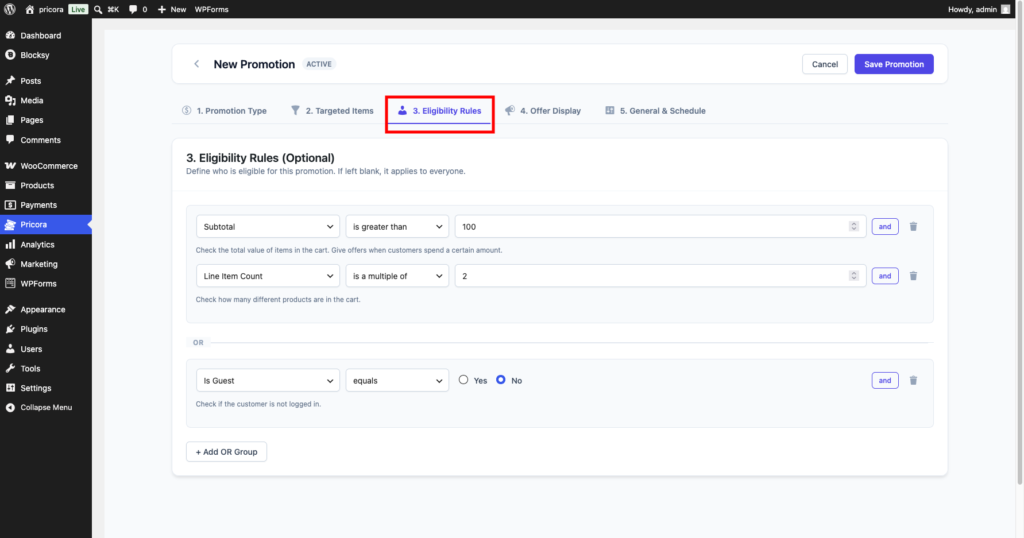
Understanding AND Logic #
AND logic means every condition must be true.
Example:
Cart Subtotal is greater than $100
AND
Customer Role equals Wholesale Customer
Result
The promotion applies only when both conditions are satisfied.
Understanding OR Logic #
OR logic means any rule group can be true.
Example:
Cart Total greater than $500OR
First Order equals YesResult
The promotion applies if either condition is satisfied.
Example Rule Structure #
Example configuration:
Group 1

Cart Total > $500
AND
Customer Role = Wholesale
OR
Group 2

Is First Order = Yes
Result
The promotion applies when either rule group passes.
Available Eligibility Rule Categories #
Ezhance organizes conditions into six major categories.
Cart Conditions #
Cart Conditions evaluate the overall shopping cart.
Available conditions include:
- Subtotal
- Order Total
- Item Quantity
- Line Item Count
- Total Weight
- Applied Coupons
- Has Coupon Applied
- Payment Method
Examples:
Subtotal greater than $100Total Weight less than 20kgPayment Method equals Cash on DeliveryCart Item Conditions #
Cart Item Conditions evaluate products inside the cart.
Available conditions include:
- Products
- Categories
- Attributes
- Tags
Each condition supports quantity-based checks.
Examples:
Products IN LIST Hoodies
Quantity >= 3
Categories IN LIST Accessories
Quantity >= 2Result
The promotion only applies when matching cart items meet the quantity requirements.
Customer Conditions #
Customer Conditions evaluate the current customer.
Available conditions include:
- Guest Customer
- User Role
- Customer Email
- Customer ID
- Account Created Date
Examples:
User Role = WholesaleGuest Customer = YesAccount Created Date more than 30 days agoPurchase History Conditions #
Purchase History Conditions evaluate previous customer orders.
Available conditions include:
- Has Ordered Before
- Order Count
- Total Spend
- Last Order Date
- Purchased Products
- Purchased Categories
Examples:
Total Spend greater than $500Order Count greater than 10Has Ordered Before = YesThese conditions are ideal for loyalty campaigns.
Billing Conditions #
Billing Conditions evaluate billing address information.
Available conditions include:
- Billing City
- Billing State
- Billing Country
- Billing Postcode
Examples:
Billing Country = United StatesBilling State = CaliforniaUseful for region-specific promotions.
Shipping Conditions #
Shipping Conditions evaluate shipping address information.
Available conditions include:
- Shipping City
- Shipping State
- Shipping Country
- Shipping Postcode
Examples:
Shipping Country = CanadaShipping Postcode starts with 900Useful for delivery-area promotions.
Shop Conditions #
Shop Conditions evaluate store-wide settings and time-based events.
Available conditions include:
- Current Date
- Current Time
Examples:
Current Date is between
December 1 and December 31
Current Time is between
9:00 AM and 5:00 PMPerfect for seasonal and flash-sale campaigns.
Date-Based Conditions #
Several conditions support advanced date operators.
Supported operators:
- Is Before
- Is After
- Is On
- Is Not On
- Is In Range
- Is Within Last
- Is Not Within Last
- Is More Than
- Is Less Than
Examples:
Last Order Date is within last 30 daysAccount Created Date is more than 1 year agoThese operators provide powerful time-based targeting.
Common Use Cases #
Minimum Order Promotions #
Subtotal > $100Reward larger orders.
First-Time Customer Offers #
Is First Order = YesAcquire new customers.
VIP Customer Discounts #
Total Spend > $1000Reward loyal customers.
Wholesale Promotions #
User Role = WholesaleCreate role-based pricing campaigns.
Seasonal Sales #
Current Date between
November 25 and November 30
Run Black Friday promotions.
Regional Promotions #
Shipping Country = AustraliaTarget specific markets.
Eligibility Rules Evaluation Order #
Ezhance evaluates promotions using the following sequence:
1. Target Selection #
Determine which products receive the promotion.
2. Eligibility Rules #
Determine whether the customer qualifies.
3. Promotion Calculation #
Calculate the discount or reward.
4. Offer Display #
Display promotional messages.
5. Checkout Validation #
Verify conditions still pass before completing the order.
Best Practices #
Keep Rules Simple #
Use the minimum number of conditions necessary.
Group Related Conditions #
Combine related requirements using AND logic.
Use OR Groups Carefully #
Too many OR groups can make promotions difficult to manage.
Test Before Publishing #
Always test promotions using different customer and cart scenarios.
Separate Product and Customer Logic #
Use Target Selection for products and Eligibility Rules for qualification requirements.
This keeps promotions easier to understand and maintain.
Target Selection vs Eligibility Rules #
| Feature | Target Selection | Eligibility Rules |
|---|---|---|
| Purpose | Controls WHAT receives promotion | Controls WHO qualifies |
| Focus | Products | Customers and carts |
| Uses | Products, Categories, Tags, Attributes | Cart, Customer, Purchase History, Billing, Shipping, Shop Conditions |
| Evaluation Order | First | Second |
This separation is the foundation of Ezhance’s promotion engine.