

Introduction #
Order Coupon promotions reward customers with a discount coupon after they complete a purchase.
Unlike Cart Discounts, which reduce the current order total, Order Coupons create a coupon for the customer’s next purchase.
This promotion type is perfect for:
- Increasing repeat purchases
- Customer retention campaigns
- Loyalty rewards
- Post-purchase marketing
- Thank-you incentives
The generated coupon can be displayed on:
- Thank You Page
- Order Confirmation Email
- Both locations
Quick Example #
In this example, we will reward customers with a 10% discount coupon after placing an order above $500.
- Promotion Type: Order Coupon
- Coupon Type: Percentage Discount
- Coupon Value: 10%
- Duration: 30 Days
- Eligibility Rules: Order Total greater than $500
- Display: Thank You Page + Email
Result:
Customers receive a unique 10% discount coupon after completing their purchase. The coupon remains valid for 30 days.
How Order Coupons Work #
After a customer completes an eligible order:
- Ezhance validates all eligibility rules.
- A unique WooCommerce coupon is generated.
- The coupon expiration date is calculated.
- The coupon voucher is displayed to the customer.
- The customer can use the coupon on a future purchase.
This creates a strong incentive for customers to return and buy again.
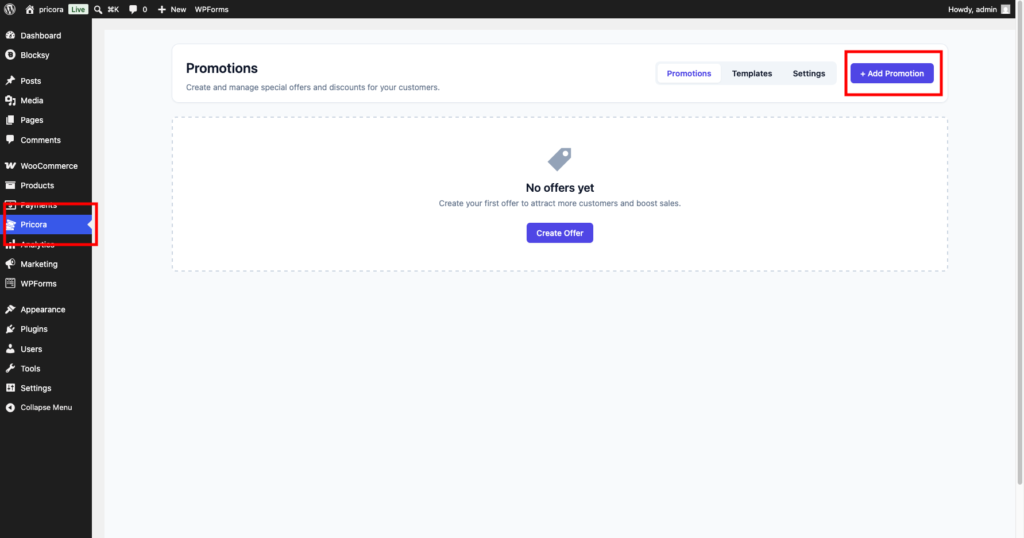
Step 1: Create a Promotion #
Navigate to:
Ezhance → Promotions
Click Create Promotion.
Step 2: Select Order Coupon #
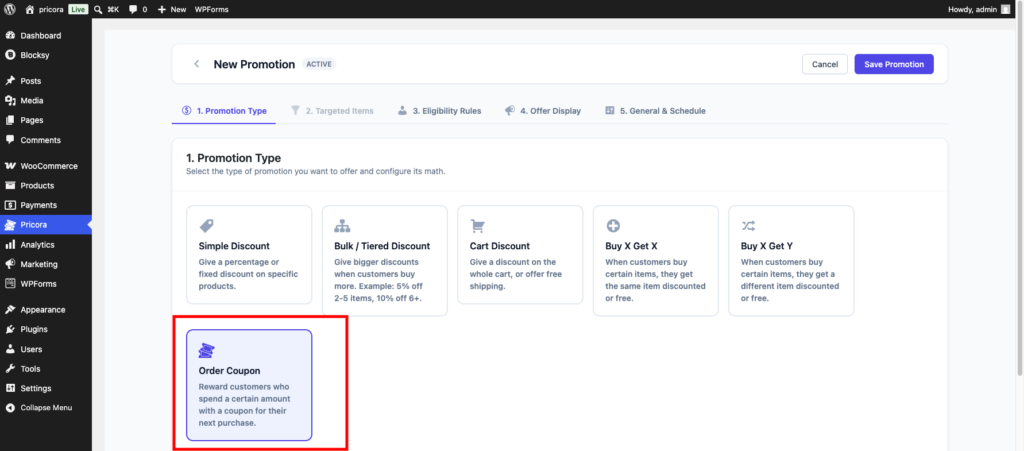
Under Promotion Type, select:
Order Coupon
Order Coupon promotions reward customers with a coupon voucher for their next purchase.
Step 3: Configure Order Coupon Settings #
Configure how the generated coupon should behave.
Coupon Type #
Choose the type of coupon customers will receive.
Available options:
- Percentage Discount
- Fixed Cart Discount
Examples:
10% Offor
$20 OffCoupon Value #
Enter the coupon amount.
Examples:
10For Percentage Discount:
10 = 10% OffFor Fixed Cart Discount:
10 = $10 OffDuration #
Specify how long the generated coupon remains valid.
Example:
30Unit #
Choose the expiration unit.
Available options:
- Days
- Weeks
- Months
- Years
Example:
30 Days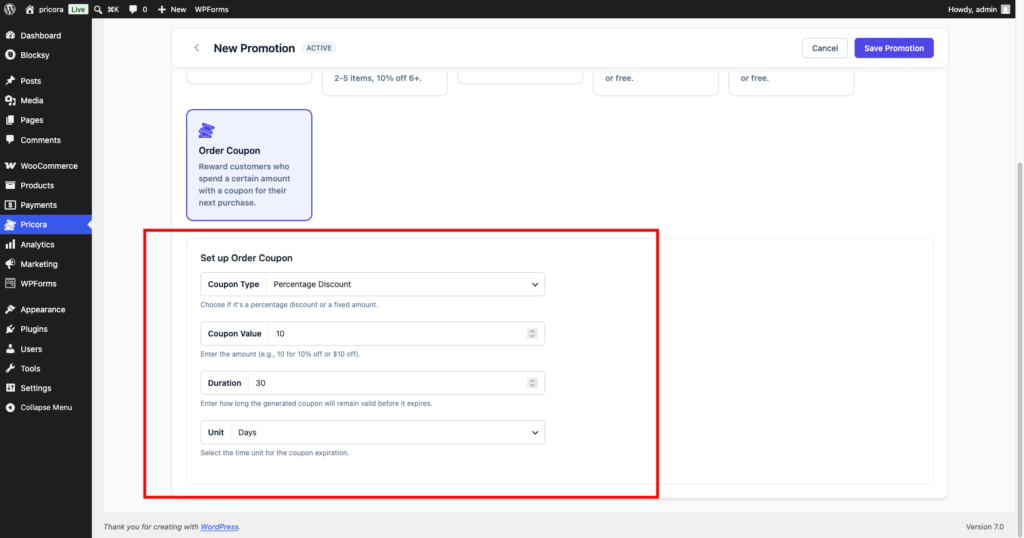
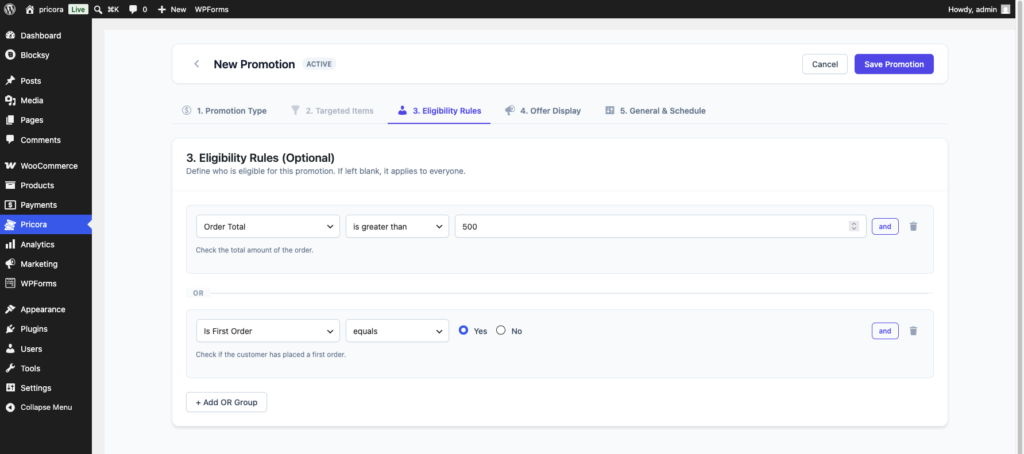
Step 4: Configure Eligibility Rules #
Order Coupons become much more powerful when combined with eligibility rules.
Examples:
High Value Orders #
Order Total > 500Reward customers who place larger orders.
First-Time Customers #
Is First Order = YesEncourage new customers to return.
VIP Customers #
Customer Role = VIPProvide exclusive rewards.
Holiday Campaigns #
Reward customers only during specific promotional periods.
Step 5: Configure Voucher Display #
Choose where customers should see the generated coupon.
Available locations:
Thank You Page #
Display the coupon immediately after checkout.
Email #
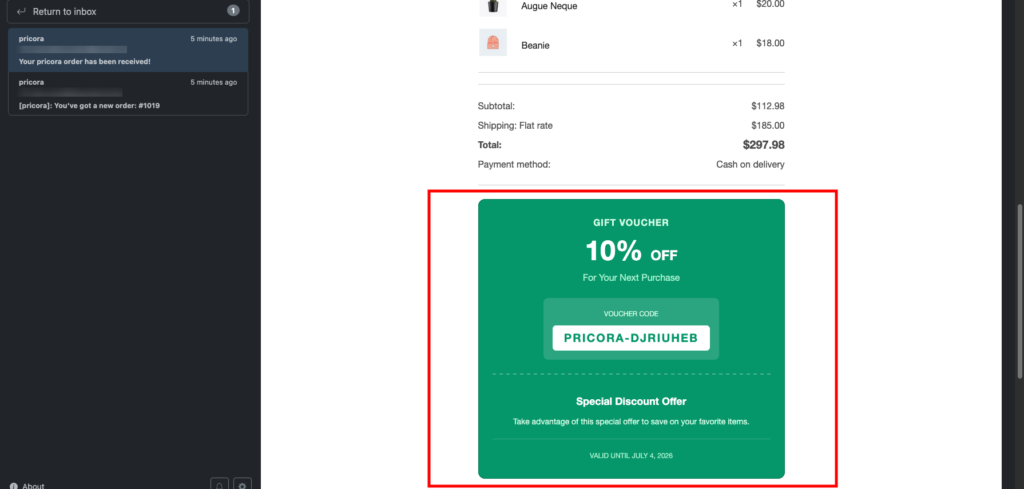
Include the coupon voucher inside WooCommerce order emails.
Both #
Display the voucher on both locations for maximum visibility.
Voucher Title #
Main heading shown on the voucher.
Example:
Special Discount OfferVoucher Subtitle #
Secondary heading shown on the voucher.
Example:
For Your Next OrderVoucher Description #
Additional promotional text displayed to customers.
Example:
Take advantage of this special offer to save on your favorite items.Supported placeholders:
{{coupon_code}}
{{discount}}
{{customer_name}}
{{expiry_date}}
{{store_name}}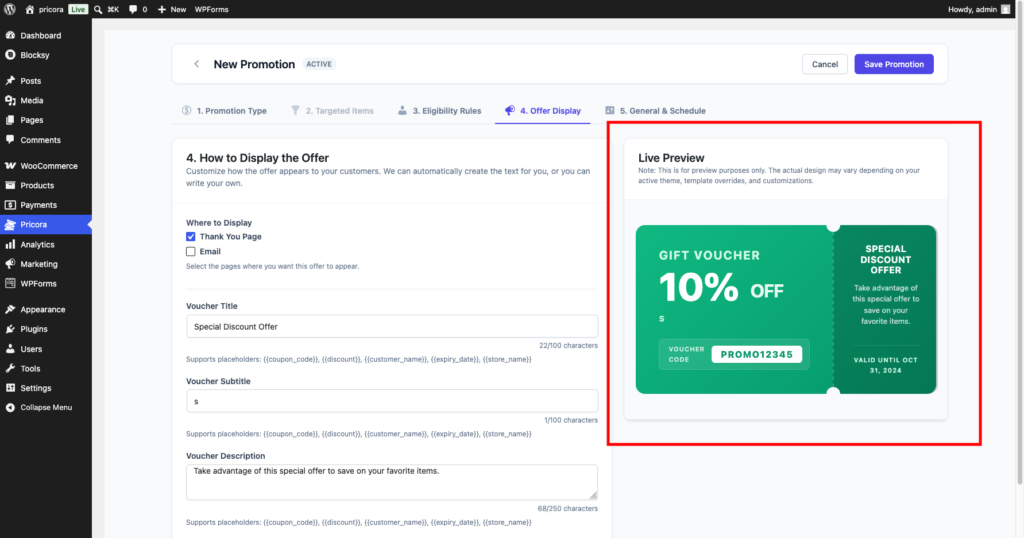
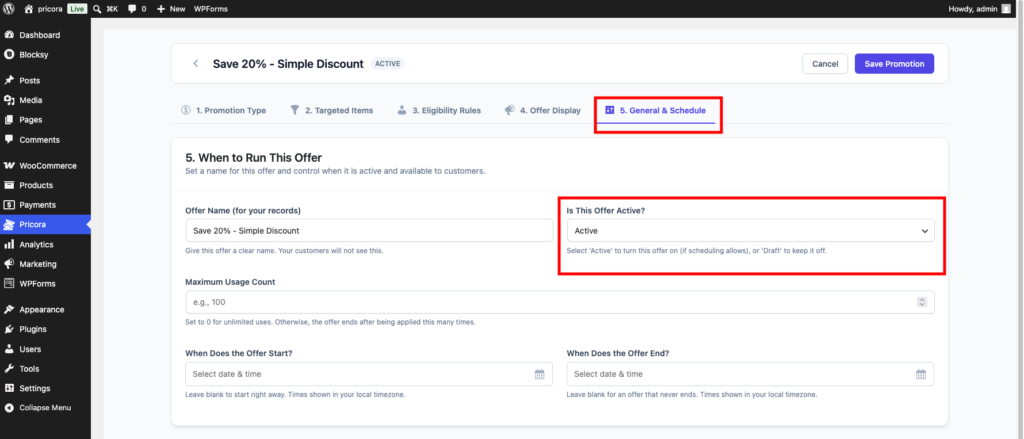
Step 6: Configure Schedule Settings #
Optionally configure:
- Start Date
- End Date
- Promotion Priority
- Usage Limits
Common examples:
- Black Friday Campaign
- Holiday Sale
- Customer Loyalty Program
- Seasonal Promotions
Step 7: Save the Promotion #
Click Save Promotion.
Ezhance will automatically begin generating coupons whenever customers complete qualifying orders.

Storefront Result (Thank You Page) #
After checkout, customers see a professionally designed coupon voucher.
The voucher displays:
- Discount Amount
- Coupon Code
- Offer Description
- Expiration Date

Email Result #
The same coupon voucher can also be delivered directly to the customer’s inbox.
Benefits include:
- Increased visibility
- Easier coupon retrieval
- Better repeat purchase rates
Example Promotions #
First Order Reward #
Coupon Type: Percentage Discount
Coupon Value: 10%
Duration: 30 Days
Eligibility Rule: First Order
Result:
Customers receive 10% off their next purchase.
Spend $500, Get $50 Off #
Coupon Type: Fixed Cart Discount
Coupon Value: $50
Duration: 60 Days
Eligibility Rule: Order Total > $500
Result:
High-spending customers receive a reward coupon.
VIP Customer Reward #
Coupon Type: Percentage Discount
Coupon Value: 15%
Duration: 90 Days
Eligibility Rule: Customer Role = VIP
Result:
VIP customers receive exclusive future discounts.
Holiday Campaign #
Coupon Type: Percentage Discount
Coupon Value: 20%
Duration: 14 Days
Result:
Customers are encouraged to return before the coupon expires.
Common Use Cases #
Customer Retention #
Encourage customers to return after their first purchase.
Loyalty Programs #
Reward repeat customers with future discounts.
Seasonal Campaigns #
Increase repeat sales during promotional periods.
VIP Rewards #
Offer exclusive incentives to premium customers.
Post-Purchase Marketing #
Create an automated customer re-engagement strategy.
Tips #
Use Expiration Dates #
Shorter expiration periods create urgency and increase redemption rates.
Reward High-Value Customers #
Combine Order Coupons with Order Total conditions.
Display Coupons in Both Locations #
Showing coupons on the Thank You Page and Email maximizes visibility.
Keep Discounts Attractive #
10–20% discounts generally perform well for repeat purchase campaigns.
Order Coupon vs Cart Discount #
| Feature | Cart Discount | Order Coupon |
|---|---|---|
| Applies To Current Order | Yes | No |
| Applies To Future Order | No | Yes |
| Generates Coupon Code | No | Yes |
| Customer Retention | Low | High |
| Repeat Purchase Incentive | No | Yes |
Use Order Coupons when your goal is increasing customer lifetime value and encouraging future purchases.