Skip to content
  • About
  • Blog
  • Changelog
  • Contact
  • Cookie Policy
  • Features
  • Home
  • Plugin License Agreement (EULA)
  • Pricing
  • Privacy Policy
  • Refund Policy
  • Support
  • Support Policy
  • Terms & Conditions
Ezhance logo – WooCommerce promotion, discount, loyalty and customer retention platformEzhance logo – WooCommerce promotion, discount, loyalty and customer retention platform
  • Home
  • Pricing
  • Documentation
  • Blog
  • Contact
Login
View Online Demo
Ezhance logo – WooCommerce promotion, discount, loyalty and customer retention platformEzhance logo – WooCommerce promotion, discount, loyalty and customer retention platform

Getting Started

5
  • Why Isn’t My Promotion Applying?
  • Free vs Pro
  • How to Create Your First Promotion?
  • How to Install Ezhance?
  • How Ezhance Works?

Promotion Types

6
  • How to Create Order Coupon Promotions
  • How to Create Buy X Get Y Promotions?
  • How to Create Buy X Get X Promotions?
  • How to Create Cart Discount?
  • How to Create Bulk Discount Promotions?
  • How to Create Simple Discount Promotions?

Target Selection

7
  • Exclude Sale Items
  • Include vs Exclude Rules
  • Product Attributes Target
  • Product Tags Target
  • Products Target
  • Product Categories Target
  • Target Selection Overview

Eligibility Rules

8
  • Shipping Conditions Overview
  • Billing Conditions Overview
  • Shop Conditions Overview
  • Purchase History Overview
  • Customer Conditions Overview
  • Cart Item Conditions Overview
  • Cart Conditions Overview
  • Eligibility Rules Overview

Display Components

1
  • Display Components Overview

FAQ

9
  • Why Is My Discount Different Than Expected?
  • Which Promotion Wins When Multiple Promotions Match?
  • Can Multiple Promotions Apply Together?
  • Why Isn’t My Order Coupon Generated?
  • Why Isn’t My Free Gift Added?
  • Why Isn’t My Cart Discount Applying?
  • Why Aren’t My Promotion Displays Showing?
  • Why Isn’t My Bulk Discount Showing?
  • Why Isn’t My Promotion Applying?

Global Settings

1
  • Global Settings Overview
View Categories
  • Home
  • Docs
  • Promotion Types
  • How to Create Buy X Get X Promotions?

How to Create Buy X Get X Promotions?

Sathya
Updated on June 5, 2026

2 min read

Introduction #

Buy X Get X promotions allow customers to receive additional quantities of the same product when they purchase a required quantity.

This promotion type is commonly known as:

  • Buy One Get One Free (BOGO)
  • Buy 2 Get 1 Free
  • Buy 3 Get 1 Half Price
  • Buy 5 Get 2 Free

Ezhance automatically adds the reward quantity to the cart and applies either a free price or discounted price based on your configuration.


Quick Example #

In this example, we will create a Buy 2 Get 1 Free promotion.

  • Promotion Type: Buy X Get X
  • Buy Quantity: 2
  • Get Quantity: 1
  • Discount Type: Free
  • Target: Hoodies
  • Eligibility Rules: None
  • Display: BOGO Product Card

Result:

When customers purchase 2 hoodies, Ezhance automatically adds 1 additional hoodie to the cart for free.


How Buy X Get X Works #

Buy X Get X promotions use three core settings:

Buy Quantity #

How many products the customer must purchase.

Get Quantity #

How many additional products the customer receives.

Discount Type #

Whether the reward products are:

  • Free
  • Discounted

Once the requirements are met, Ezhance automatically adds the reward items to the cart.


Step 1: Create a Promotion #

Navigate to:

Ezhance → Promotions

Click Create Promotion.
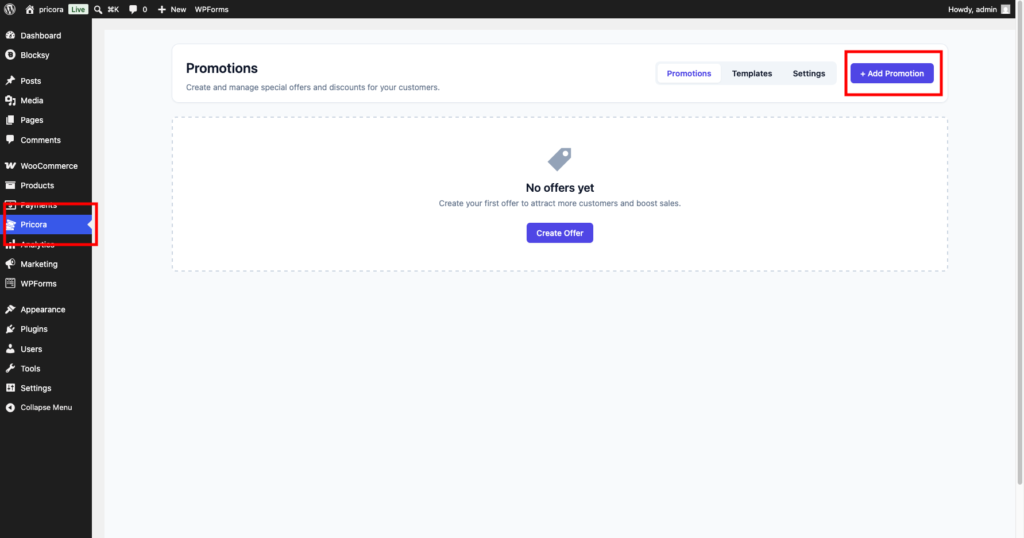
Ezhance promotions dashboard showing the create promotion button

Step 2: Select Buy X Get X #

In the Promotion Type section, select:

Buy X Get X

This promotion type rewards customers with additional quantities of the same product.
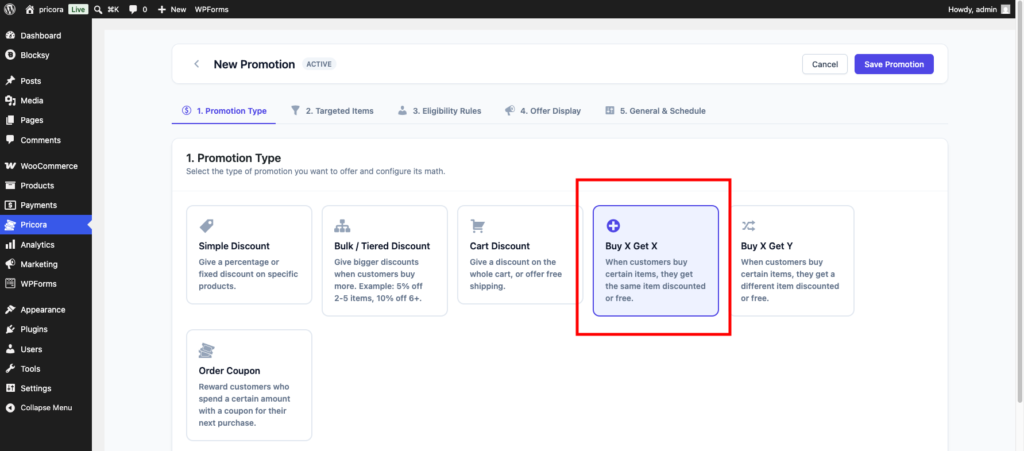
Buy X Get X promotion type selected in the Ezhance promotion builder

Step 3: Configure Buy X Get X Settings #

Configure the promotion requirements.

Buy Quantity #

Enter the number of products customers must purchase.

Example:

Buy Quantity: 2

Get Quantity #

Enter the number of products customers receive.

Example:

Get Quantity: 1

Discount Type #

Choose how reward products should be priced.

Available options:

  • Free
  • Percentage Discount
  • Fixed Discount

For a traditional BOGO promotion, select:

Free
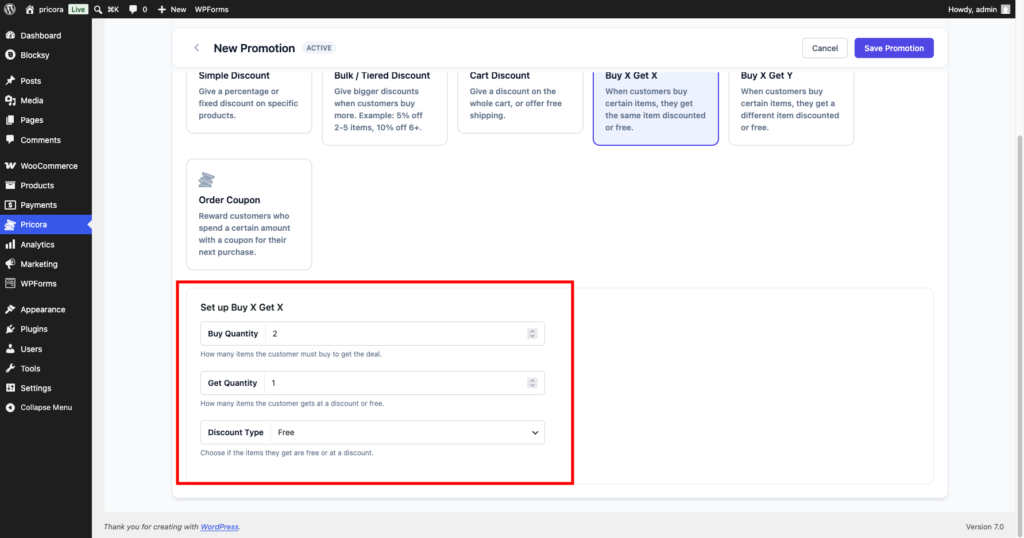
Buy X Get X settings showing Buy Quantity 2, Get Quantity 1, and Discount Type Free

Step 4: Select Target Products #

Choose which products participate in the promotion.

Free Version #

  • Specific Products

Pro Version #

  • Product Categories
  • Product Attributes
  • Product Tags
  • Items On Sale

Example:

Hoodies

Customers purchasing targeted products become eligible for the reward.
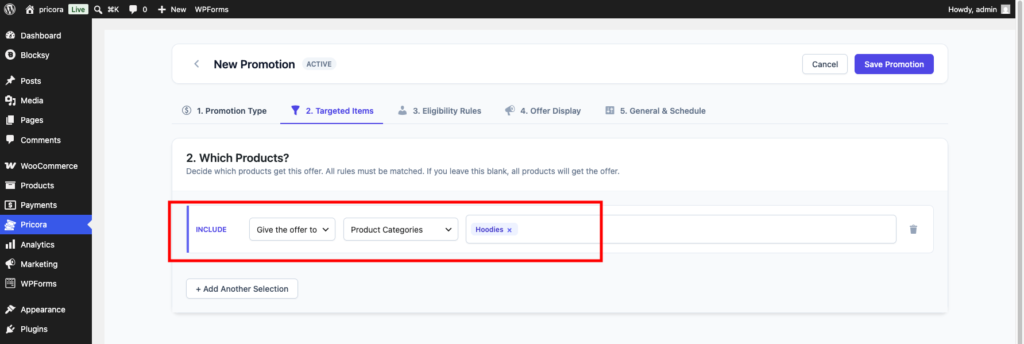
Ezhance target selection configured for Buy X Get X promotion

Step 5: Configure Eligibility Rules #

Eligibility rules can be used to limit who qualifies.

Examples:

  • Subtotal greater than $100
  • Customer Role equals Wholesale
  • Customer has ordered before
  • Weekend Promotion

If no rules are configured, all customers qualify.
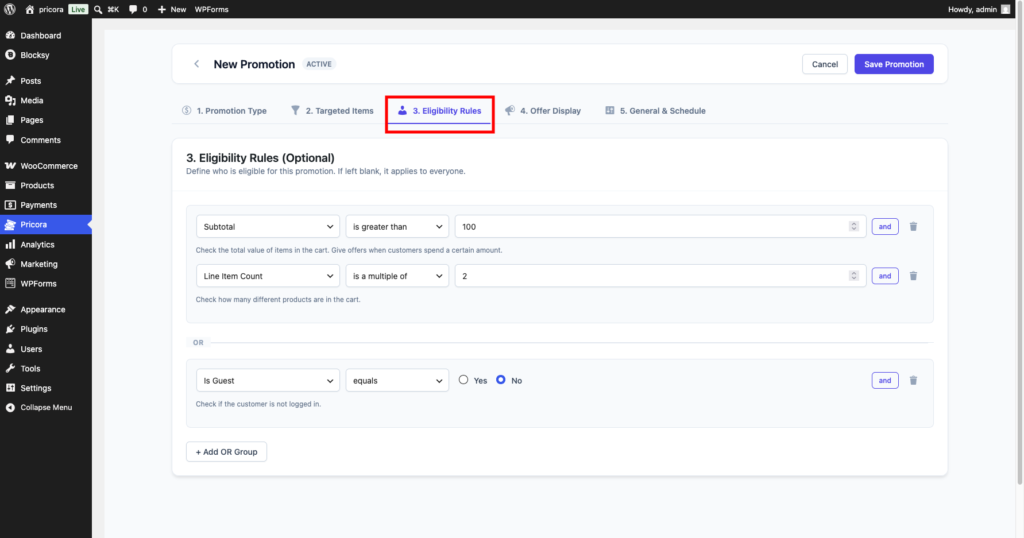
Ezhance eligibility rules section showing available rule groups

Step 6: Configure Display Components #

Display components help customers discover the promotion.

Recommended displays:

  • BOGO Product Card
  • Offer Card
  • Countdown Timer
  • Savings Message

For Buy X Get X promotions, BOGO Product Cards are strongly recommended.
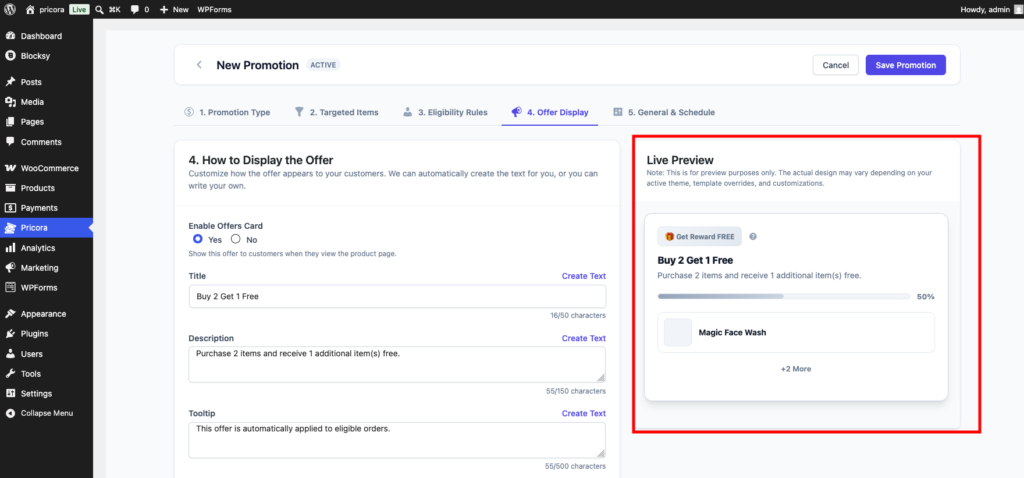
Ezhance display settings showing BOGO Product Card enabled

Step 7: Configure Schedule Settings #

Optionally configure:

  • Start Date
  • End Date
  • Promotion Priority
  • Usage Limits

Examples:

  • Weekend Sale
  • Flash Sale
  • Seasonal Promotion
Ezhance promotion schedule settings showing start date end date and status options

Step 8: Save the Promotion #

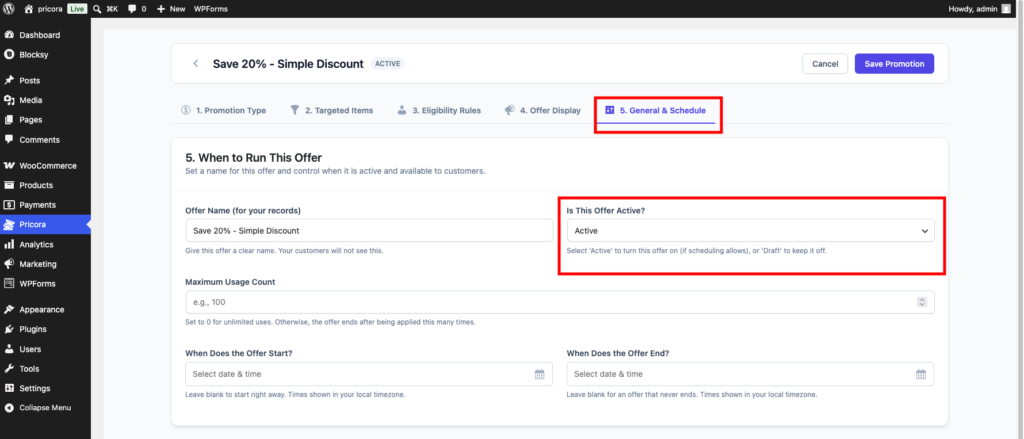
Click Save Promotion.

Ezhance will immediately begin monitoring carts and applying rewards when requirements are met.

Ezhance save promotion button used to publish a promotion

Storefront Result #

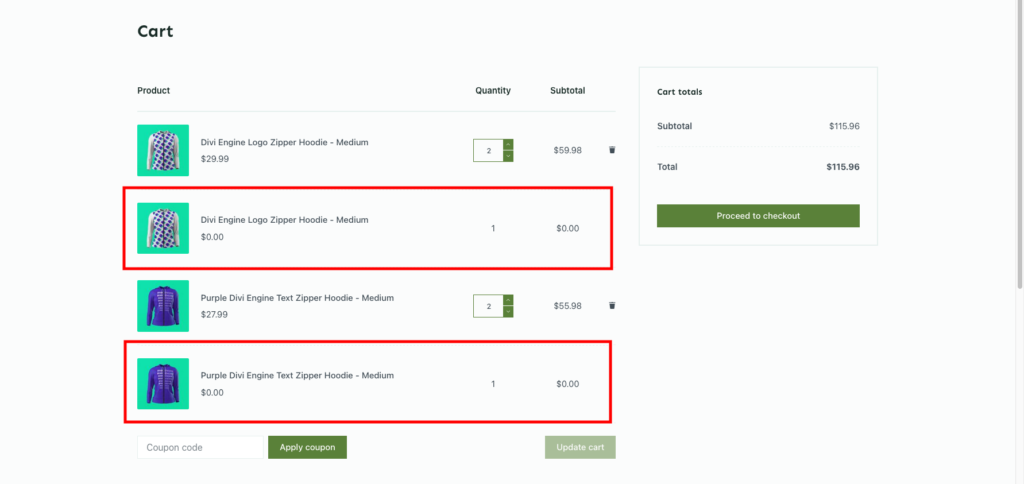
When the customer qualifies for the promotion, Ezhance automatically adds the reward quantity to the cart.

In the example below:

  • Customer purchases 2 hoodies
  • Ezhance automatically adds 1 additional hoodie
  • Reward hoodie is priced at $0.00
WooCommerce cart showing free reward products automatically added by a Buy X Get X promotion

Example Promotions #

Buy One Get One Free #

Buy Quantity: 1
Get Quantity: 1
Discount Type: Free

Result:

Buy 1 item and receive 1 free item.


Buy 2 Get 1 Free #

Buy Quantity: 2
Get Quantity: 1
Discount Type: Free

Result:

Buy 2 items and receive 1 free item.


Buy 3 Get 1 at 50% Off #

Buy Quantity: 3
Get Quantity: 1
Discount Type: 50% Discount

Result:

Buy 3 items and receive a fourth item at a reduced price.


Buy 5 Get 2 Free #

Buy Quantity: 5
Get Quantity: 2
Discount Type: Free

Result:

Buy 5 items and receive 2 additional items for free.


Common Use Cases #

Clothing Stores #

Buy 2 T-Shirts, Get 1 Free.


Grocery Stores #

Buy 3 Snacks, Get 1 Free.


Beauty Products #

Buy 2 Skincare Products, Get 1 Free.


Seasonal Campaigns #

Run limited-time BOGO promotions during holiday sales.


Inventory Clearance #

Move inventory faster by rewarding larger purchases.


Tips #

Use BOGO Product Cards #

Clearly communicating the offer improves conversion rates.


Keep Offers Simple #

Buy 1 Get 1 Free and Buy 2 Get 1 Free tend to perform best.


Combine with Countdown Timers #

Adding urgency often increases participation.


Review Promotion Priority #

When multiple promotions target the same products, priority determines which promotion is applied.

bogo, buy 2 get 1 free, buy one get one free, buy x get x, ezhance, free product promotion, woocommerce bogo, woocommerce discounts
How to Create Buy X Get Y Promotions?How to Create Cart Discount?

Leave a Reply

You must be logged in to post a comment.

Table of Contents
  • Introduction
  • Quick Example
  • How Buy X Get X Works
    • Buy Quantity
    • Get Quantity
    • Discount Type
  • Step 1: Create a Promotion
  • Step 2: Select Buy X Get X
  • Step 3: Configure Buy X Get X Settings
    • Buy Quantity
    • Get Quantity
    • Discount Type
  • Step 4: Select Target Products
    • Free Version
    • Pro Version
  • Step 5: Configure Eligibility Rules
  • Step 6: Configure Display Components
  • Step 7: Configure Schedule Settings
  • Step 8: Save the Promotion
  • Storefront Result
  • Example Promotions
    • Buy One Get One Free
    • Buy 2 Get 1 Free
    • Buy 3 Get 1 at 50% Off
    • Buy 5 Get 2 Free
  • Common Use Cases
    • Clothing Stores
    • Grocery Stores
    • Beauty Products
    • Seasonal Campaigns
    • Inventory Clearance
  • Tips
    • Use BOGO Product Cards
    • Keep Offers Simple
    • Combine with Countdown Timers
    • Review Promotion Priority

Share This Article :

  • Facebook
  • X
  • LinkedIn
  • Pinterest

Was it helpful ?

  • Happy
  • Normal
  • Sad

Ready to Create Better
WooCommerce Promotions?

Start with Ezhance Free or unlock advanced promotions with Ezhance Pro.

Download FreeGet Ezhance Pro
  • No Credit Card Required
  • 14-Day Money Back Guarantee
  • Trusted by WooCommerce Stores
Ezhance logo – WooCommerce promotion, discount, loyalty and customer retention platform

Create discounts, bulk pricing, cart discounts, and BOGO offers with a modern WooCommerce promotion engine.

Product
  • Pricing
  • Features
  • Changelog
  • Download Free
Resources
  • Documentation
  • Blog
  • Use Cases
  • Support
Company
  • Contact
  • Privacy Policy
  • Refund Policy
  • Support Policy
  • Terms & Conditions

©2026 Ezhance. All rights reserved.

Loading...

Insert/edit link

Enter the destination URL

Or link to existing content

    No search term specified. Showing recent items. Search or use up and down arrow keys to select an item.