Skip to content
  • About
  • Blog
  • Changelog
  • Contact
  • Cookie Policy
  • Features
  • Home
  • Plugin License Agreement (EULA)
  • Pricing
  • Privacy Policy
  • Refund Policy
  • Support
  • Support Policy
  • Terms & Conditions
Ezhance logo – WooCommerce promotion, discount, loyalty and customer retention platformEzhance logo – WooCommerce promotion, discount, loyalty and customer retention platform
  • Home
  • Pricing
  • Documentation
  • Blog
  • Contact
Login
View Online Demo
Ezhance logo – WooCommerce promotion, discount, loyalty and customer retention platformEzhance logo – WooCommerce promotion, discount, loyalty and customer retention platform

Getting Started

5
  • Why Isn’t My Promotion Applying?
  • Free vs Pro
  • How to Create Your First Promotion?
  • How to Install Ezhance?
  • How Ezhance Works?

Promotion Types

6
  • How to Create Order Coupon Promotions
  • How to Create Buy X Get Y Promotions?
  • How to Create Buy X Get X Promotions?
  • How to Create Cart Discount?
  • How to Create Bulk Discount Promotions?
  • How to Create Simple Discount Promotions?

Target Selection

7
  • Exclude Sale Items
  • Include vs Exclude Rules
  • Product Attributes Target
  • Product Tags Target
  • Products Target
  • Product Categories Target
  • Target Selection Overview

Eligibility Rules

8
  • Shipping Conditions Overview
  • Billing Conditions Overview
  • Shop Conditions Overview
  • Purchase History Overview
  • Customer Conditions Overview
  • Cart Item Conditions Overview
  • Cart Conditions Overview
  • Eligibility Rules Overview

Display Components

1
  • Display Components Overview

FAQ

9
  • Why Is My Discount Different Than Expected?
  • Which Promotion Wins When Multiple Promotions Match?
  • Can Multiple Promotions Apply Together?
  • Why Isn’t My Order Coupon Generated?
  • Why Isn’t My Free Gift Added?
  • Why Isn’t My Cart Discount Applying?
  • Why Aren’t My Promotion Displays Showing?
  • Why Isn’t My Bulk Discount Showing?
  • Why Isn’t My Promotion Applying?

Global Settings

1
  • Global Settings Overview
View Categories
  • Home
  • Docs
  • Promotion Types
  • How to Create Bulk Discount Promotions?

How to Create Bulk Discount Promotions?

Sathya
Updated on June 5, 2026

3 min read

Introduction #

Bulk Discounts allow you to reward customers for purchasing larger quantities of products.

Instead of offering the same price regardless of quantity, you can create pricing tiers that provide increasing discounts as customers buy more.

Bulk Discounts are one of the most effective ways to increase average order value and encourage customers to purchase additional items.


Quick Example #

In this example, we will create a bulk pricing promotion for coffee mugs.

  • Promotion Type: Bulk Discount
  • Discount
    • Buy 2–4 → 10% Off
    • Buy 5–9 → 15% Off
    • Buy 10+ → 20% Off
  • Target: Coffee Mugs
  • Eligibility Rules: None
  • Display: Tier Pricing Table

Result:

Customers receive larger discounts as they purchase more coffee mugs.


How Bulk Discounts Work #

Bulk Discounts use quantity tiers.

Each tier defines:

  • Minimum Quantity
  • Maximum Quantity (optional)
  • Discount Type
  • Discount Value

When a customer adds products to their cart, Ezhance evaluates the quantity purchased and applies the matching discount tier.


Step 1: Create a Promotion #

Navigate to:

Ezhance → Promotions

Click Create Promotion.
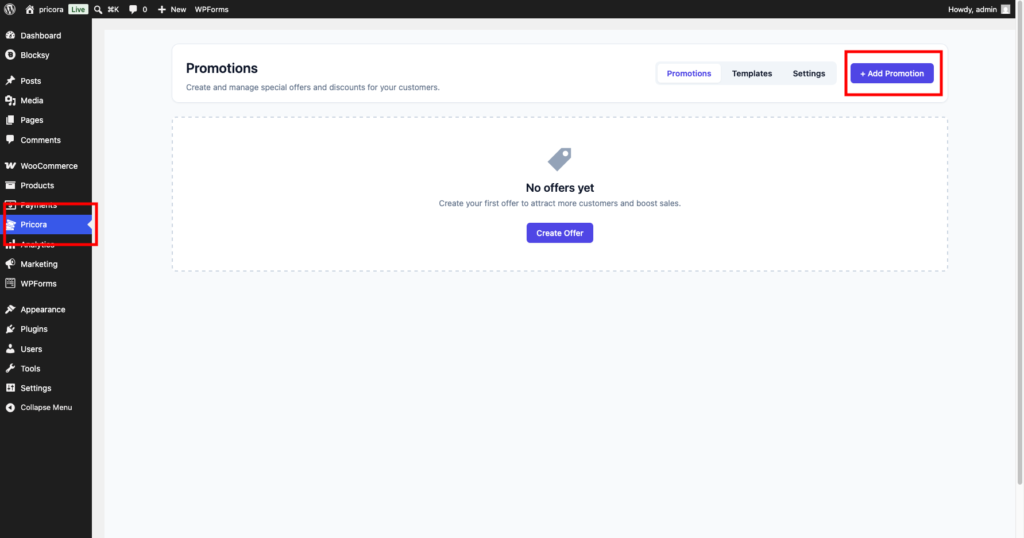
Ezhance promotions dashboard showing the create promotion button

Step 2: Select Bulk Discount #

In the Promotion Type section, select:

Bulk Discount

This enables quantity-based pricing tiers.
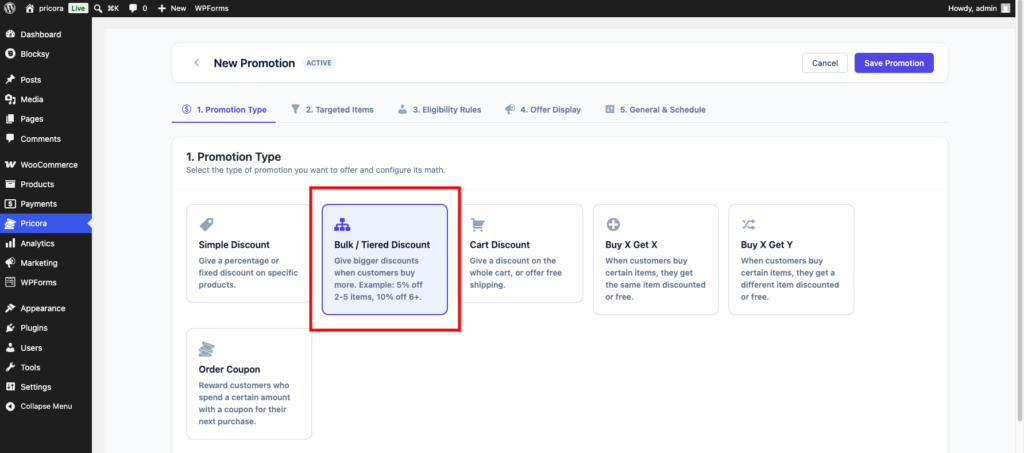
Ezhance promotion type section showing bulk discount selected

Step 3: Create Pricing Tiers #

Add one or more discount tiers.

Example:

Tier 1 #

Quantity: 2–4

Discount: 10%

Tier 2 #

Quantity: 5–9

Discount: 15%

Tier 3 #

Quantity: 10+

Discount: 20%

Customers automatically receive the discount associated with the quantity they purchase.
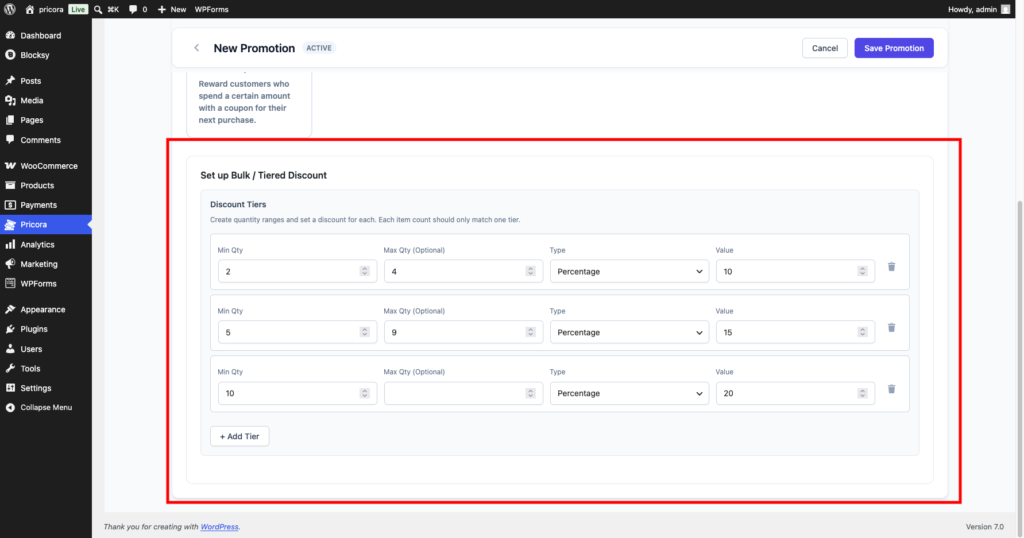
Ezhance bulk discount settings showing multiple quantity discount tiers

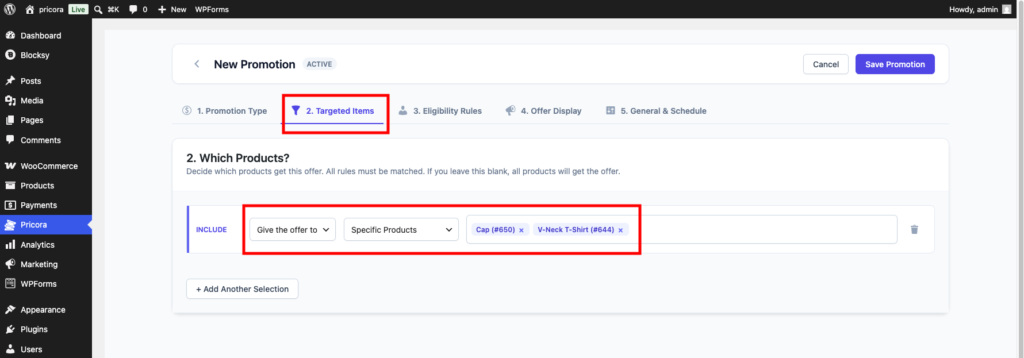
Step 4: Select Targets #

Choose which products should use bulk pricing.

Free Version #

  • Specific Products

Pro Version #

  • Product Categories
  • Product Attributes
  • Product Tags
  • Items On Sale

Examples:

  • Coffee Mugs
  • T-Shirts
  • Kitchen Products
  • Office Supplies
Ezhance target selection settings showing specific product targeting

Step 5: Configure Eligibility Rules #

Eligibility Rules can further restrict who qualifies for bulk pricing.

Examples:

  • Subtotal greater than $100
  • Customer Role equals Wholesale
  • Customer has ordered before
  • Shipping Country equals Canada

If no rules are configured, the promotion applies whenever quantity requirements are met.
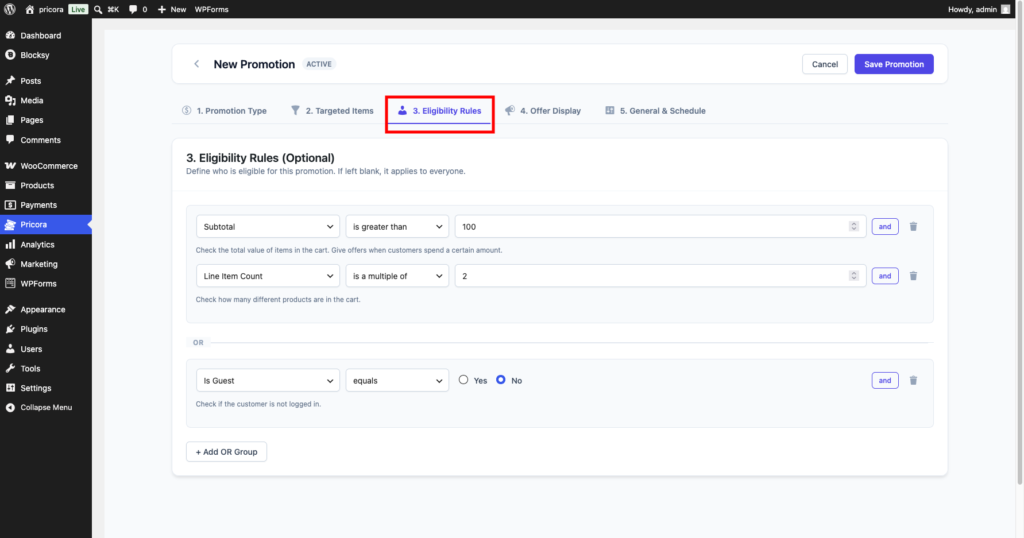
Ezhance eligibility rules section showing available rule groups

Step 6: Configure Display Components #

Bulk Discounts perform best when customers can clearly see available pricing tiers.

Recommended display components:

  • Tier Pricing Table
  • Offer Card
  • Savings Message
  • Countdown Timer

For most stores, the Tier Pricing Table should always be enabled.
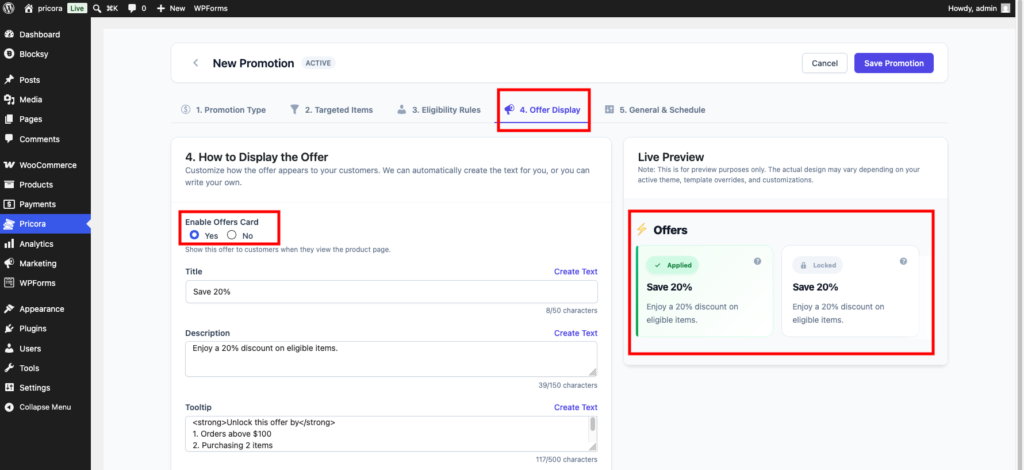
Ezhance display settings showing offer card configuration

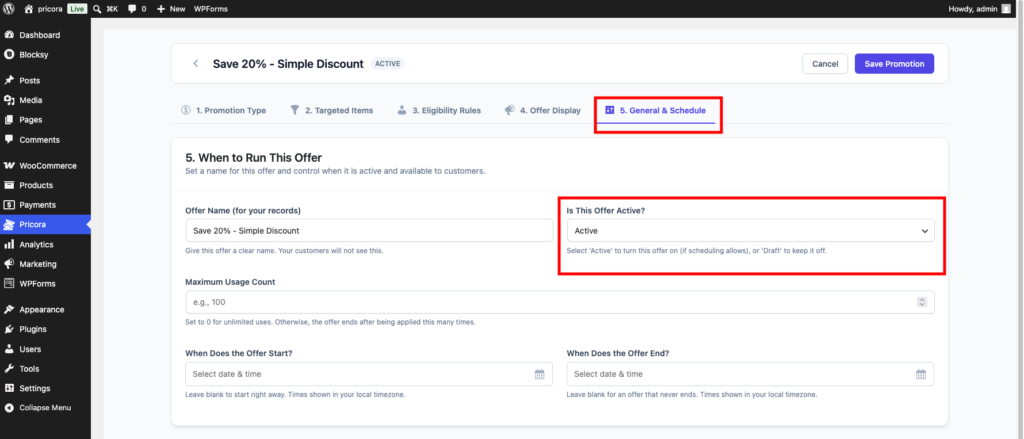
Step 7: Configure Schedule #

Optionally configure:

  • Start Date
  • End Date
  • Promotion Priority
  • Usage Limits

Examples:

  • Weekend Sale
  • Wholesale Pricing Event
  • Seasonal Promotion
Ezhance promotion schedule settings showing start date end date and status options

Step 8: Save the Promotion #

Click Save Promotion.

Ezhance will begin evaluating quantities and applying the appropriate discount tiers.

Ezhance save promotion button used to publish a promotion

Storefront Result #

Customers will immediately see available quantity discounts on the product page.

As quantities increase, Ezhance automatically applies the appropriate pricing tier.
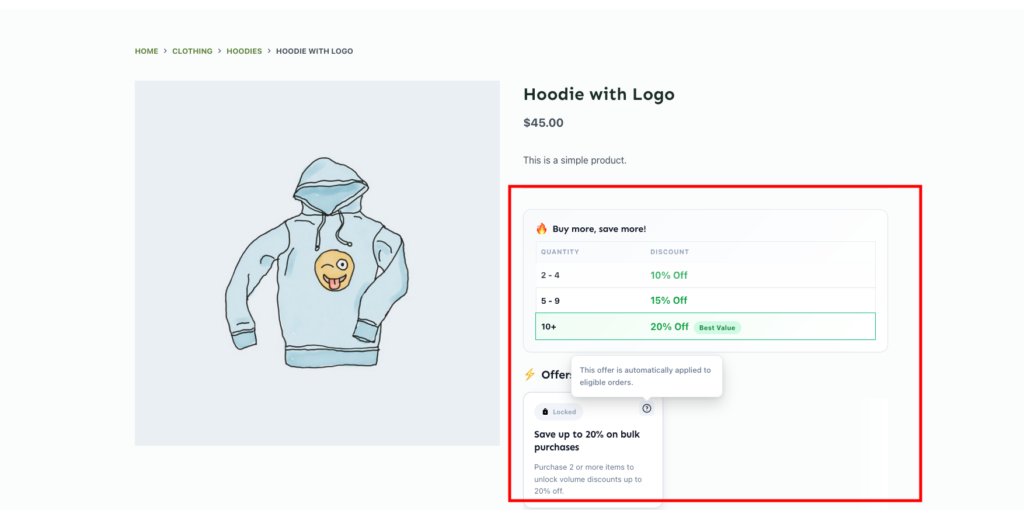
WooCommerce product page displaying a Ezhance tier pricing table with quantity discounts

Common Use Cases #

Wholesale Pricing #

Offer larger discounts to customers purchasing products in bulk.


Product Bundling #

Encourage customers to purchase multiple units of the same product.


Inventory Clearance #

Move excess stock by offering better pricing for larger purchases.


Seasonal Campaigns #

Reward customers for larger holiday purchases.


Business Supplies #

Offer volume discounts on office and business products.


Tips #

Keep Pricing Tiers Simple #

Three to five tiers are usually easier for customers to understand than a large number of pricing levels.


Display the Tier Pricing Table #

Showing available discounts often increases quantity purchased.


Increase Discounts Gradually #

Each tier should provide a meaningful incentive for customers to add more products.


Combine with Customer Conditions #

Create special bulk pricing offers for wholesalers, VIP customers, or repeat buyers.

bulk discount, ezhance, quantity discount, tiered pricing, volume discount, woocommerce bulk pricing
How to Create Cart Discount?How to Create Simple Discount Promotions?

Leave a Reply

You must be logged in to post a comment.

Table of Contents
  • Introduction
  • Quick Example
  • How Bulk Discounts Work
  • Step 1: Create a Promotion
  • Step 2: Select Bulk Discount
  • Step 3: Create Pricing Tiers
    • Tier 1
    • Tier 2
    • Tier 3
  • Step 4: Select Targets
    • Free Version
    • Pro Version
  • Step 5: Configure Eligibility Rules
  • Step 6: Configure Display Components
  • Step 7: Configure Schedule
  • Step 8: Save the Promotion
  • Storefront Result
  • Common Use Cases
    • Wholesale Pricing
    • Product Bundling
    • Inventory Clearance
    • Seasonal Campaigns
    • Business Supplies
  • Tips
    • Keep Pricing Tiers Simple
    • Display the Tier Pricing Table
    • Increase Discounts Gradually
    • Combine with Customer Conditions

Share This Article :

  • Facebook
  • X
  • LinkedIn
  • Pinterest

Was it helpful ?

  • Happy
  • Normal
  • Sad

Ready to Create Better
WooCommerce Promotions?

Start with Ezhance Free or unlock advanced promotions with Ezhance Pro.

Download FreeGet Ezhance Pro
  • No Credit Card Required
  • 14-Day Money Back Guarantee
  • Trusted by WooCommerce Stores
Ezhance logo – WooCommerce promotion, discount, loyalty and customer retention platform

Create discounts, bulk pricing, cart discounts, and BOGO offers with a modern WooCommerce promotion engine.

Product
  • Pricing
  • Features
  • Changelog
  • Download Free
Resources
  • Documentation
  • Blog
  • Use Cases
  • Support
Company
  • Contact
  • Privacy Policy
  • Refund Policy
  • Support Policy
  • Terms & Conditions

©2026 Ezhance. All rights reserved.

Loading...

Insert/edit link

Enter the destination URL

Or link to existing content

    No search term specified. Showing recent items. Search or use up and down arrow keys to select an item.