
Skip to content
  • About
  • Blog
  • Changelog
  • Contact
  • Cookie Policy
  • Features
  • Home
  • Plugin License Agreement (EULA)
  • Pricing
  • Privacy Policy
  • Refund Policy
  • Support
  • Support Policy
  • Terms & Conditions
Ezhance logo – WooCommerce promotion, discount, loyalty and customer retention platformEzhance logo – WooCommerce promotion, discount, loyalty and customer retention platform
  • Home
  • Pricing
  • Documentation
  • Blog
  • Contact
Login
View Online Demo
Ezhance logo – WooCommerce promotion, discount, loyalty and customer retention platformEzhance logo – WooCommerce promotion, discount, loyalty and customer retention platform

Getting Started

5
  • Why Isn’t My Promotion Applying?
  • Free vs Pro
  • How to Create Your First Promotion?
  • How to Install Ezhance?
  • How Ezhance Works?

Promotion Types

6
  • How to Create Order Coupon Promotions
  • How to Create Buy X Get Y Promotions?
  • How to Create Buy X Get X Promotions?
  • How to Create Cart Discount?
  • How to Create Bulk Discount Promotions?
  • How to Create Simple Discount Promotions?

Target Selection

7
  • Exclude Sale Items
  • Include vs Exclude Rules
  • Product Attributes Target
  • Product Tags Target
  • Products Target
  • Product Categories Target
  • Target Selection Overview

Eligibility Rules

8
  • Shipping Conditions Overview
  • Billing Conditions Overview
  • Shop Conditions Overview
  • Purchase History Overview
  • Customer Conditions Overview
  • Cart Item Conditions Overview
  • Cart Conditions Overview
  • Eligibility Rules Overview

Display Components

1
  • Display Components Overview

FAQ

9
  • Why Is My Discount Different Than Expected?
  • Which Promotion Wins When Multiple Promotions Match?
  • Can Multiple Promotions Apply Together?
  • Why Isn’t My Order Coupon Generated?
  • Why Isn’t My Free Gift Added?
  • Why Isn’t My Cart Discount Applying?
  • Why Aren’t My Promotion Displays Showing?
  • Why Isn’t My Bulk Discount Showing?
  • Why Isn’t My Promotion Applying?

Global Settings

1
  • Global Settings Overview
View Categories
  • Home
  • Docs
  • Getting Started
  • How to Install Ezhance?

How to Install Ezhance?

Sathya
Updated on June 5, 2026

1 min read

Introduction #

Ezhance is a WooCommerce promotion engine that helps you create discounts, bulk pricing offers, BOGO campaigns, cart discounts, and customer rewards without complex configuration.

This guide walks you through the installation process and helps you verify that Ezhance is ready to use.


Quick Example #

After installation, you can create your first promotion in just a few minutes.

  • Promotion Type: Simple Discount
  • Discount: 20% Off
  • Target: Specific Products

Result

Customers automatically receive a 20% discount on selected products.


Requirements #

Before installing Ezhance, make sure your website meets the following requirements:

  • WordPress 6.0 or higher
  • WooCommerce 8.0 or higher
  • PHP 7.4 or higher
  • Administrator access to WordPress

We recommend keeping WordPress, WooCommerce, and all plugins updated to the latest stable versions.


Step 1: Download Ezhance #

Download the latest version of Ezhance from:

  • WordPress Plugin Repository (Free Version)
  • Ezhance Website (Pro Version)

Save the plugin ZIP file to your computer.

📷 Screenshot: Download Ezhance Plugin

Alt Text: Ezhance plugin download page showing free and pro download options


Step 2: Upload the Plugin #

In your WordPress dashboard:

  1. Navigate to Plugins → Add New Plugin
  2. Click Upload Plugin
  3. Select the Ezhance ZIP file
  4. Click Install Now

Wait for WordPress to complete the installation.

📷 Screenshot: Upload Plugin Screen

Alt Text: WordPress upload plugin screen showing Ezhance ZIP file installation


Step 3: Activate Ezhance #

Once installation is complete:

  1. Click Activate Plugin
  2. Wait for activation to finish
  3. Ezhance will appear in the WordPress admin menu

After activation, Ezhance is ready to use.
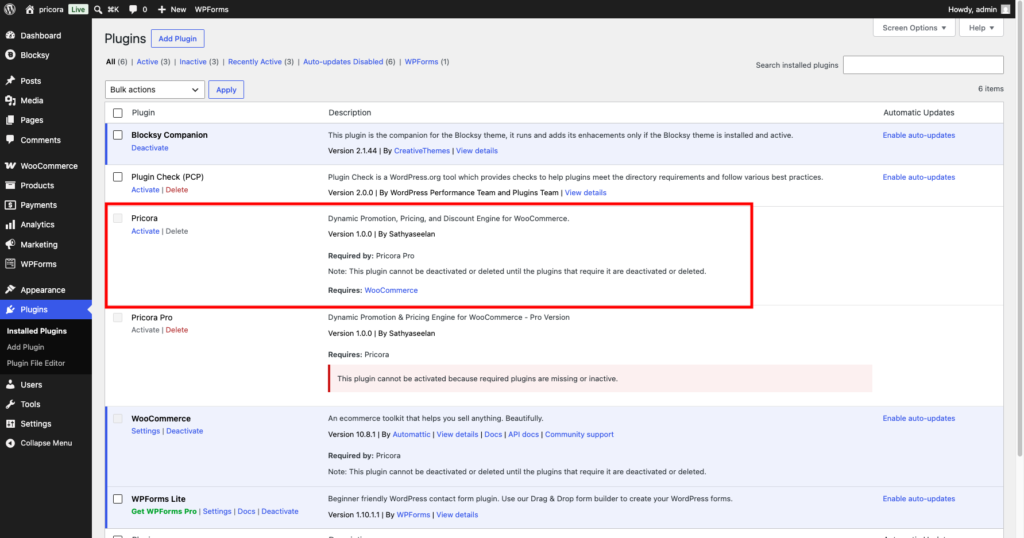
Ezhance plugin menu displayed in the WordPress administration dashboard

Step 4: Verify WooCommerce Integration #

Navigate to:

Ezhance → Promotions

Create a test promotion to verify that Ezhance is communicating correctly with WooCommerce.

If the promotion builder loads successfully, the installation is complete.
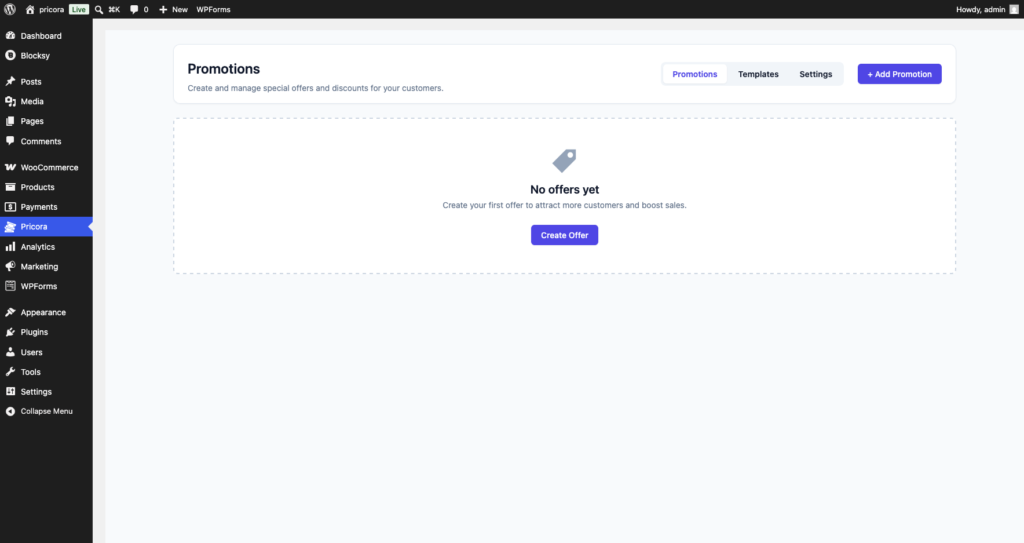
Ezhance promotions dashboard showing promotion management and creation options

Step 5: Configure Global Settings #

Before creating promotions, review the global settings.

Navigate to:

Ezhance → Settings

Recommended settings:

  • What Price to Use for Discounts: Regular Price
  • When Multiple Offers Apply to a Product: Give the biggest discount
  • When Multiple Offers Apply to the Cart: Give the best discount and free shipping

These settings can be changed later as your promotion strategy evolves.
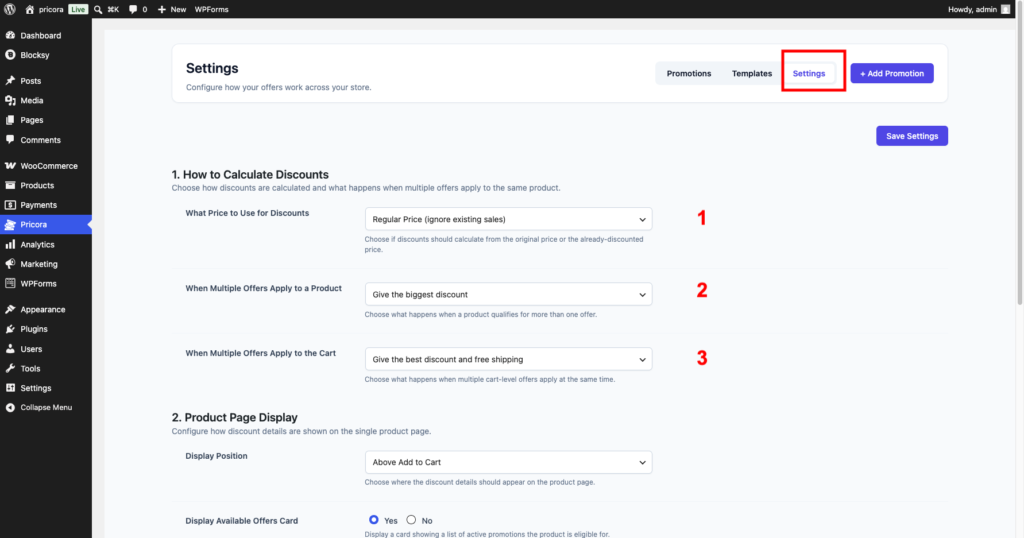
Ezhance global settings page showing pricing source and promotion stacking options

Installation Complete #

Congratulations! Ezhance is now installed and ready to use.

You can begin creating:

  • Simple Discounts
  • Bulk Discounts
  • Cart Discounts
  • Buy X Get X Promotions
  • Buy X Get Y Promotions
  • Order Coupon Campaigns

Common Installation Issues #

Ezhance Menu Not Appearing #

Try the following:

  • Refresh the WordPress dashboard
  • Verify that the plugin is activated
  • Check that WooCommerce is installed and active

WooCommerce Not Detected #

Make sure WooCommerce is installed and activated before activating Ezhance.


Promotion Builder Not Loading #

Check for:

  • JavaScript errors
  • Plugin conflicts
  • Outdated PHP versions

Try temporarily disabling other plugins to identify conflicts.

ezhance, getting started, installation, setup, woocommerce discounts, wordpress plugin
How to Create Your First Promotion?How Ezhance Works?

Leave a Reply

You must be logged in to post a comment.

Table of Contents
  • Introduction
  • Quick Example
  • Requirements
  • Step 1: Download Ezhance
  • Step 2: Upload the Plugin
  • Step 3: Activate Ezhance
  • Step 4: Verify WooCommerce Integration
  • Step 5: Configure Global Settings
  • Installation Complete
  • Common Installation Issues
    • Ezhance Menu Not Appearing
    • WooCommerce Not Detected
    • Promotion Builder Not Loading

Share This Article :

  • Facebook
  • X
  • LinkedIn
  • Pinterest

Was it helpful ?

  • Happy
  • Normal
  • Sad

Ready to Create Better
WooCommerce Promotions?

Start with Ezhance Free or unlock advanced promotions with Ezhance Pro.

Download FreeGet Ezhance Pro
  • No Credit Card Required
  • 14-Day Money Back Guarantee
  • Trusted by WooCommerce Stores
Ezhance logo – WooCommerce promotion, discount, loyalty and customer retention platform

Create discounts, bulk pricing, cart discounts, and BOGO offers with a modern WooCommerce promotion engine.

Product
  • Pricing
  • Features
  • Changelog
  • Download Free
Resources
  • Documentation
  • Blog
  • Use Cases
  • Support
Company
  • Contact
  • Privacy Policy
  • Refund Policy
  • Support Policy
  • Terms & Conditions

©2026 Ezhance. All rights reserved.

Loading...

Insert/edit link

Enter the destination URL

Or link to existing content

    No search term specified. Showing recent items. Search or use up and down arrow keys to select an item.