
WooCommerce Cart Discount
ProWooCommerce Cart Discount Plugin
Automatically apply a percentage or fixed discount to the WooCommerce cart when it reaches a subtotal or item count threshold. A cart progress bar shows customers how close they are — no coupon code required.
Spend More, Save More — Automatic Cart Rewards
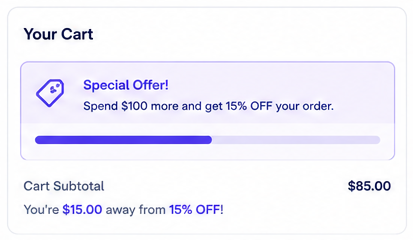
Cart discounts are the most effective tool for increasing average order value. A clear threshold — "spend $100, get 10% off" — gives customers a concrete incentive to add more items.
When to Use Cart Discounts
Use Cart Thresholds to Give Shoppers a Clear Next Step
Cart discounts are useful when the store wants to shape average order value. The key is making the reward visible before checkout and setting a threshold that is close enough to feel achievable.
Spend threshold
Spend $100 and get 10% off. A shopper at $82 sees that adding $18 unlocks the reward.
Free shipping-style goal
Offer free shipping when the cart reaches a qualifying subtotal and show the remaining amount in the cart.
Quantity threshold
Require a minimum number of cart line items when the campaign should encourage broader basket building.
Use Carefully
When Cart Discounts Can Become Too Broad
Avoid cart-wide discounts when product margins vary widely unless you review margin risk first.
Avoid thresholds that are too far above normal order value; customers may ignore a reward that feels unreachable.
Avoid hidden cart discounts. If the customer cannot see the progress message, the threshold cannot guide basket size.
FAQ