
WooCommerce BOGO
WooCommerce BOGO Plugin
Create Buy X Get X and Buy X Get Y promotions in WooCommerce with Ezhance Pro. Automatic BOGO offers apply when the qualifying product or quantity is in the cart — no coupon code required.
Free vs Pro
BOGO Is a Pro Promotion Type
Ezhance Free covers Simple Product Discount and Bulk / Tiered Product Discount. Ezhance Pro adds Buy X Get X and Buy X Get Y for stores that need same-product BOGO, cross-product rewards, automatic reward behavior, and BOGO reward cards.
The qualifying product and reward product are the same. Buy 1 get 1, buy 3 get 1, buy 5 get 2 — any quantity combination. Classic BOGO for same-product campaigns.
- Classic buy-one-get-one-free
- Quantity bundle rewards
- Clearance stock movement
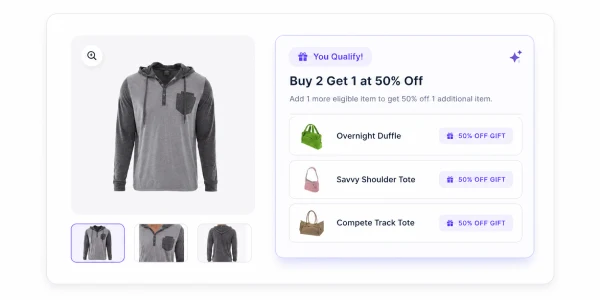
The qualifying product and reward product are different. Buy a camera, get a memory card free. Buy a pair of shoes, get socks at 50% off. Cross-sell BOGO for product pairing campaigns.
- Cross-sell paired products
- Accessory and add-on rewards
- Product launch companion offers
When to Use BOGO
Use BOGO When the Reward Supports a Real Merchandising Goal
BOGO is strongest when it changes shopper behavior in a way the store actually wants: more units of the same product, a paired accessory purchase, a sample introduction, or controlled stock movement. It should not be treated as a generic discount replacement.
Same-product BOGO
Use Buy X Get X when shoppers should receive more of the same product, such as buy one hoodie and get another hoodie free.
Cross-product reward
Use Buy X Get Y when the reward should be a different product, such as buy a camera and get a memory card free.
Inventory movement
Use BOGO carefully for overstocked products where moving units is a business priority and margin impact has been reviewed.
Use Carefully
When BOGO May Be the Wrong Promotion
Avoid BOGO on thin-margin products unless the reward discount is intentionally priced and reviewed.
Avoid stacking BOGO with broad cart or product discounts unless the combined discount depth is intended.
Avoid unclear BOGO messaging. Customers should know what they must buy, what they receive, and whether the reward is free or discounted.
Related Pages
Plan the Right BOGO Campaign
FAQ