
Comparison
Best WooCommerce Discount Plugins? Compare the Workflow First
The right WooCommerce discount plugin depends on the promotion workflow a store needs. Merchants should compare promotion types, whether offers are visible before checkout, how targeting works, whether promotion usage is tracked, and whether the plugin helps review margin risk before launch.
Plain Definition
How Should Merchants Compare Discount Plugins?
There is no single best WooCommerce discount plugin for every store. Merchants should compare supported promotion types, free tier usefulness, storefront display, targeting depth, scheduling, usage limits, analytics, support, and risk review. Ezhance is positioned as a profit-aware WooCommerce promotion plugin for merchants who care about offer visibility, margin context, stock-aware campaigns, promotion tracking, and pre-launch safety checks.
Free vs Pro
Ezhance Free covers simple discounts, bulk pricing, offer display, scheduling, usage limits, analytics, margin visibility, and Offer Safety Score. Ezhance Pro adds BOGO, cart discounts, next-order coupons, advanced targeting, advanced display components, margin range targeting, and stock-aware rules.
Ezhance Free covers simple discounts, bulk pricing, offer display, tracking, margin visibility, and Offer Safety Score.
Ezhance Pro adds BOGO, cart discounts, order reward coupons, advanced targeting, and display components.
Comparisons should be fair and based on merchant needs, not only feature counts.
Best Fit
When Merchants Should Use This
Use this page when evaluating whether a discount plugin should do more than create rules.
Use it when comparing free tier value, BOGO support, display components, and safety checks.
Use it when an agency needs a repeatable promotion workflow for client stores.
Use Carefully
When It May Not Be the Right Offer
Do not choose a plugin only because it has the longest feature list.
Do not ignore whether shoppers can actually see and understand the offer.
Do not ignore support, documentation, release activity, and compatibility with the store setup.
Visual Proof
What the Merchant or Customer Can See
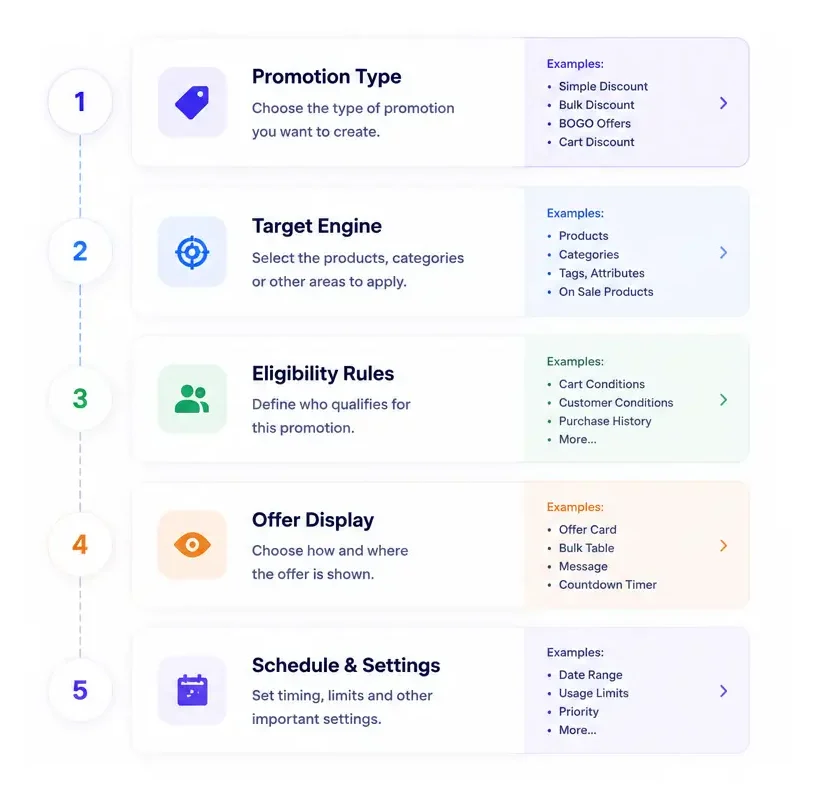
A useful plugin comparison should include workflow: setup, storefront visibility, controls, tracking, and risk review.
Examples
Real WooCommerce Promotion Use Cases
These examples show how the page topic connects to everyday ecommerce promotion work, not just plugin settings.
Basic discount need
A store only needs product discounts and quantity tiers, so a strong free tier may be enough.
Growth campaign need
A store needs cart thresholds, BOGO, and next-order rewards, so Pro promotion types matter.
Risk-control need
A store runs frequent promotions and needs margin, stock, tracking, and safety review built into the workflow.
Planning Notes
How to Evaluate This Before Launch
Before publishing a WooCommerce promotion, review the customer-facing message, the products included, the products excluded, the qualification rule, and the expected discount cost. A good campaign should be easy for shoppers to understand and easy for the store owner to review after orders come in.
Ezhance is designed for that workflow: create the offer, show it in the right storefront location, control who or what qualifies, track promotion usage in WooCommerce orders, and review Offer Safety Score before launch. The score is decision support only, so merchants should still test promotions with the active theme, tax, shipping, payment, and checkout setup.
Core Ezhance Coverage
FAQ